
Writing Information to Windows Event Logs using .NET Framework
Introduction
In .NET Framework, we can use the System.Diagnostics.EventLog class to handle operations related to Windows Event Logs. EventLog has two main parameters: Source and LogName.
- Source: Typically used to identify the application name. If you want to write to an event log, it is recommended to first check if the source already exists. If it does not, you can use the
EventLog.CreateEventSource(source, logName)method to create a new source.
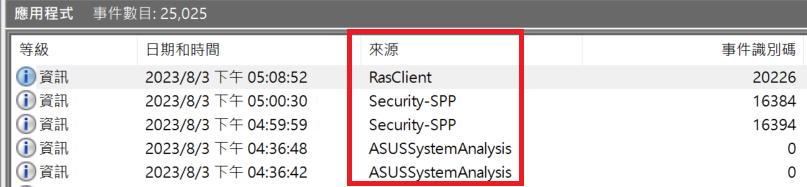
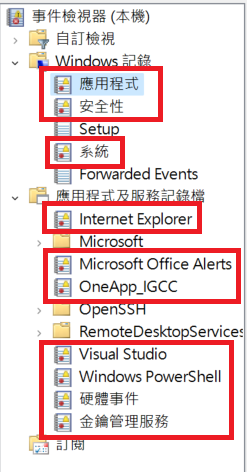
- LogName: Specifies the name of the log file to which the source project will write. A single Source can only be associated with one LogName.
Code Example
Below is a simple code example for writing messages to the event log:
string source = "MySource";

// Check if the Source exists; if not, create it
if (!EventLog.SourceExists(source)) {
    // LogName can be "Application" or the localized name, both will associate with the Application log
    EventLog.CreateEventSource(source, "Application");
}

// Write a message
EventLog.WriteEntry(source, "MyMessage");

// Alternatively, you can write it this way
using (EventLog log = new EventLog()) {
    log.Source = source;
    log.WriteEntry("MyMessage");
}Execution result:

TIP
The WriteEntry() method has other optional parameters, such as EventLogEntryType and EventID, which can be used to map to attributes like "Level" and "Event ID" in the Event Viewer. For details on these mappings, please refer to the relevant documentation; they are not covered in detail here.
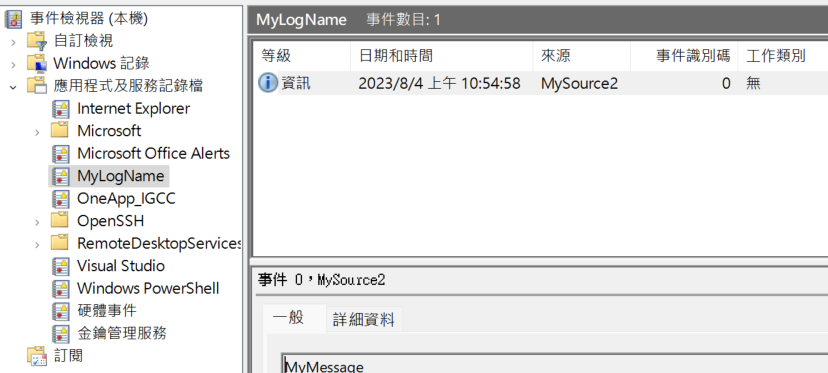
You can also customize the log name, as shown in the code below, where LogName is defined as MyLogName.
// MySource has already been used, so we change it to MySource2
string source = "MySource2";

if (!EventLog.SourceExists(source)) {
    EventLog.CreateEventSource(source, "MyLogName");
}

EventLog.WriteEntry(source, "MyMessage");Execution result:
WARNING
You must restart the Event Viewer to see the new log file.
If you want to change the LogName bound to a Source, you can use the existing Source and then re-establish the association.
string source = "MySource";
string logName = "MyLogName";

if (EventLog.SourceExists(source)) {
    string oldLogName = EventLog.LogNameFromSourceName(source, ".");
    if (oldLogName != logName) {
        EventLog.DeleteEventSource(source);
        EventLog.CreateEventSource(source, logName);
    }
} else {
    EventLog.CreateEventSource(source, logName);
}

EventLog.WriteEntry(source, "MyMessage");WARNING
The code above is modified from MSDN. You might think you can successfully re-associate the Source with a log, but in reality, you will find that the written messages are still going to the old log file. If you look closely at the documentation, you will find the following note:
If a source is already mapped to a log and you remap it to a new log, you must restart the computer for the changes to take effect.
To delete a log file, you can use EventLog.Delete(logName) to remove the specified log.
References
Change Log
- 2023-08-04 Initial document creation.